Saturday, 2 May 2020


Cryptography


The word Cryptography comes from the Greek word kryptos which means hidden, secret.

Kryptos + Graphy  = hidden +writing 

The earliest known use of cryptography is found in non-standard hieroglyphs carved into the wall of a tomb from the Old Kingdom of Egypt circa 1900 BC.
Later we saw the use of Cryptography in World War- 1 and World War -2, at this time Army were using Cryptography machines for Cryptography, Enigma machine is a good example of a machine used by German for Cryptography in Second World War.


Image of Enigma machine

Lets understand cryptography with an example. We will take a message and we will encrypt it.

 example 1:

My  name is Rahul
We will encrypt above line like this:
Rd sfrj nxwzq

By reading the above line(Rd sfrj nxwzq ) no one can understands what is written here, until he has the key to decrypt it into plain text, here we used key= 5, if anyone know that all text is change here by 5 latter ahead in English alphabet from its original latter, then that can change it again to the plane text,

Before moving ahead we need to understand few important terms like plain text and cipher text, key etc.

Plain Text:

Plain text are the text that can be read directly by human and can understand easily. This is the input data for Encryption process, here in the above example 1 plain text is:
My  name is Rahul.

Ciphertext:


Ciphertext are not human understandable text. In cryptography, cipher text is the result of some operation performed on plaintext using an algorithm.  
In example 1. Cipher text is  
Rd sfrj nxwzq

Cipher:

In cryptography, a cipher (or cypher) is an algorithm for performing encryption. Ex. ASE, DES

Key:

In cryptography, a key is a piece of information that determines the functional output of a cryptographic algorithm. For encryption algorithms, a key specifies the transformation of plaintext into ciphertext, and vice versa for decryption algorithms.
In the above example 1 Key is 5

Before we move ahead we need to understand two more important terms.

Stream Cipher and Block Cipher

Stream Cipher:


Stream Cipher is a technique used to encrypt plain text to cipher text and vise versa. It encrypt or decrypt text bit by bit, means at each bit it take action. It performs operation by XOR and It uses substitution technique for it.
In Simple words we can understand it in such a ways that to decrypt a plain text, first we need  to convert plan text in binary form then we apply encryption technique on each bit. It is called Stream Cipher.


We will take another example to understand it in better way.
Take a Plain text 9
Key is 8
Convert both in Binary form:


Digit
Binary Number
9 (Plain Text)
1001
8 (Key)
1000

Now we will perform XOR operation and the result is: 0001
So 0001 is our cipher text. And if we will convert in decimal form it is 1. Now we have
 plain text is 9
Cipher text is 1
Key is 8
So like this be Encrypt the plan text into cipher text bit by bit.

Block Cipher

This is a method of encryption in which plain text is divided into small blocks and encryption algorithm is used on each block to get cipher text. We use same key on each block for encryption.  The size of block depends on the types of algorithm we use.


There are several modes of operations for a block cipher.
Electronic Code Book
Cipher Block Chaining
Cipher Feedback Mode
Output Feedback Mode
Counter Mode

Purpose of Encryption:

This is a very good technique to send text message securely. These days Cryptography is more popular and used everywhere. We use Cryptography for Confidentiality, Authentication, Integrity, Non-repudiation.


Confidentiality: Ensuring that no one can read the message except the receiver

Authentication: Authentication means  the process or action of proving or showing something to be true, genuine, or valid, so with the help of cryptography we ensure that message should be received by authenticate person. We ensure it with the help of keys used by sender and receiver.

 Integrity: the quality of being honest and having strong moral principles, with the help of encryption we ensure that the message that we are sending should not alter or change so that receiver should get the same messages that sender send for him.

Non-repudiation: Imagine a situation where a statement's author cannot successfully dispute its authorship or the validity of an associated contract, so cryptography is used to prove that the sender really sent this message.


Now a day’s Cryptography is very common and it is used at many place while communication. when we email, when we text message from application like whats app ( Whats app user End to End Encryption (Asymmetric Encryption) technology which secure you text as well as voice conversation over network).Encryption is used in storage media to store information.  There are few popular algorithm that is used  for it, few very command cryptography algorithm are “Pretty Good Privacy (PGP)”  Phil Zimmermann developed PGP in 1991, Data encryption standard (DES) designed by IBM in 1975, RC4 (Rivest Cipher 4) designed by Ron Rivest in 1994., Advanced Encryption Standard (AES)designed by Vincent RijmenJoan Daemen in 1998 and much more, I will explain few of it in my future blogs.


There are three  cryptographic techniques: 

1. Symmetric-key cryptography
2. Public-key cryptography
3. Hash functions.

1. Symmetric-key cryptography

Symmetric encryption is a type of encryption where only one key (a secret key) is used to both encrypt and decrypt electronic information. Ex. AES

2. Public-key cryptography

Public-key cryptography is a form of Encryption where keys come in pairs. one key is Public used to Encrypt the plan text and other private key is used to decrypt the cipher test. RSA Encryption.


3. Hash functions.:


 A hash function is any function that can be used to map data of arbitrary size to fixed-size values. This function convert data into a fix size code, and if we modify data the value of hash also get change. Few popular hash algorithms are: MD5, SHA1, SHA256.


Ex. String 1 : Your String: My name is rahul
MD5 hash of string 1: 1f34ce0cd2ee72cc2dfd91d51cb9a3ee

If we will modify string 1 like string 2.

String 2: my name is rahul

MD5 hash for string 2: 4c32f8e4531f049c04e92b4ce4d89ce7

Here we just changed M (Upper case) from My in string 1 into m (Lower case) in string 2, as a result value of MD5 hash for string 2 get changed.

Why we use hash algorithm ?

Suppose there are two files and you want to check both files are same or not, so to do that its really difficult to check each line of the file, so we can covert that into Hash value. If both file have same hash value it means both are same files.

Friday, 3 April 2020


Rootkit and Keyloggers


A rootkit is a collection of computer software, typically malicious, designed to enable access to a computer or an area of its software that is not otherwise allowed (for example, to an unauthorized user) and often masks its existence or the existence of other software.

The highest management level of windows operating system is administrator, similarly in Linux OS, it is called root. Rootkit is a set of software that can modify the kernel of the OS,

 
Rootkit works at the lowest level and hence it’s very difficult to detect it. It is not visible in task bar and we cannot find it in task bar because it does not run as a part of operating system, so it becomes difficult for the antivirus to detect it.

 
The attacker always tries to send software and merge it with rootkit. So it’s impossible to remove it even after you detect it because it will not allow you to remove it.


Types of Rootkit:


User mode rootkit:

User mode rootkit attacks at the user level or the upper level – OS model. Since it works on the upper level, it will target software and other softwares or files like word, notepad etc.

Kernel Mode Rootkit:

Such software is used to target core setting of kernel model. From such software, attacker can change the registry setting and more in your computer. It is difficult to identify and handle the software because it is not a part of the OS, and difficult to detect by the antivirus.


Boot loader Rootkit:

This software affects the boot sector of computer. It affects MBR (Master boot record) or VBR (volume boot record). MBR is at the very beginning of partitioned computer mass storage devices like fixed disks or removable drives.
 

Memory rootkit:

Memory rootkit affects the RAM of your machine. As a result, it slows down the machine, consumes more memory and due to this, the other memory gets very less memory for execution and ultimately, the machine gets very slow.

Firmware rootkit:

First we need to understand firmware, then only we can understand Firmware rootkit.
Firmware is a computer program that is "embedded" in a hardware device and is an essential part of the hardware. In computing, firmware is a specific class of computer software that provides the low-level control for a device's specific hardware. Firmware can either provide a standardized operating environment for more complex device software (allowing more hardware-independence), or, for less complex devices, act as the device's complete operating system, performing all control, monitoring and data manipulation functions. So if someone affects firmware, then whole system of a machine will get affected.

 Firmware rootkit affects router, network card, hard drive and bios (Basic Input output system) . It’s difficult to find it and remove it because firmware is not usually inspected for code integrity, and the rootkit takes advantage out of it.


Virtual Rootkit

The rootkit designed for virtual machine is called Virtual Rootkit

How to remove Rootkit:

It’s very difficult to remove rootkit. Sometimes we need separate software to remove it. Nowadays, advance antivirus or anti-malware tools are also capable to remove rootkit.


Keyloggers


Keyloggers is a computer program that records every keystroke made by a computer user, especially, in order to gain fraudulent access to passwords and other confidential information. When you type anything it records everything. No matter what happens, it even records the space bar or the back space.

A keylogger can be either software or hardware.

Software keylogger:

Software Keylogger works in background and is difficult to notice by a normal user. In the background, it records everything. Software-based keyloggers are computer programs designed to work on the target computer's software.

Keyloggers has its uses as well, as many software and operating systems use it for trouble shooting for computer and network. Even Windows 10 OS uses keyloggers to improve typing performance.

Hardware keylogger:

These are the hardware independent of any software; it can be added externally like a pen drive which will capture all the activity in the computer.

Hardware Keylogger has two main parts:

The Micro controller interprets the key inputs and processes it for storage.

Memory: It uses non-volatile memory like flash memory to store the data irrespective of availability of power.

How to protect your machine from these:

1. We can use anti-keylogger software to protect our machine. This software work on          Signature-based or heuristic analysis.

2.We can set firewall rules to track what files are transferred from the computer and accordingly, we can make rules for that.

3.These days we are using advance antivirus (EDR (Endpoint Detection and Response) and XDR (Extended Detection and Response), which work on machine learning. Such antivirus can be very useful to protect computer from Rootkit and Keyloggers.

Example of a few Keyloggers

Revealer Keylogger Free

Ardamax Keylogger


Monday, 23 March 2020

Trojan Horse


In the 13th or 12th century BC, the Greeks waged war against Troy for 10 long years. Despite their efforts, they couldn’t breach the city’s defenses, as Troy was surrounded by strong stone walls. The Greeks, however, devised a clever plan—they built a large wooden horse. This horse, known as the "Trojan Horse," became the key to their victory.

The Trojan Horse was enormous, and inside it, Greek soldiers lay hidden. The Greeks left the horse at the gates of Troy, leading the Trojans to believe it was a gift, possibly signifying the end of the war. The unsuspecting Trojans brought the wooden horse into their city. That night, while the Trojans were asleep, the Greek soldiers emerged from their hiding place inside the horse. They opened the city gates, allowing the rest of the Greek army to enter. The Greeks then attacked, overwhelming the Trojan forces, destroying the city, and ultimately winning the war.

Today, cyber attackers use a similar strategy to infiltrate computers, calling their malicious programs "Trojan Horses." Once a Trojan enters a system, it has the same level of access as the machine’s administrator. It can open backdoors for other malware to invade, spy on the device, slow it down, delete files, and cause more harm than one might expect.

How to Identify a Trojan Horse on Your Machine:

Method 1: Antivirus Detection
Trojan horses can be difficult to detect because they often disguise themselves as harmless files, such as software, applications, videos, MP3s, or images. While they might seem normal on the surface, they carry out malicious activities in the background. If your antivirus software has a signature for the Trojan, it will detect it, and you’ll be notified via a pop-up. To ensure protection, always keep your antivirus updated.

Method 2: Monitor Internet Data Usage
Another way to detect a Trojan is by monitoring your device’s internet usage. If you notice unusually high data consumption, it could be a sign that spyware is running on your system, sending data to an external source. Regularly check your internet data usage to catch these suspicious activities early.

How to check internet data in Windows:


Step i : Press control + alt + delete, the below window will open then Click on task manager as shown in the below screen


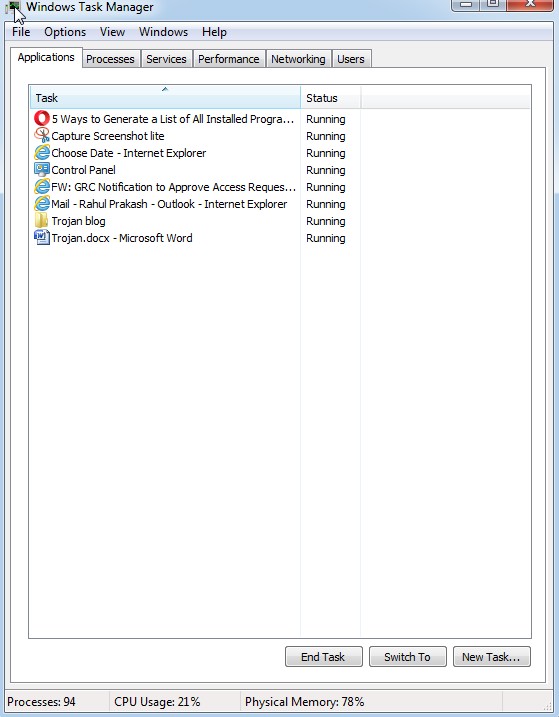
Step ii: Click on task manager below screen will open.


Step iii: Click on "Networking" button you will see all network connection details, like Adaptor name, Network Utilization, link speed and state (Connected/ Disconnected). So if you find any extra connection or data use more than expectation it means someone else connected with your computer so immediately investigate that, check all process and services running and if required delete unwanted application and stop unwanted or vulnerable  services.


Method 3. Check list of all software used by you and if you find any unknown software please uninstall or delete it.


How to check all installed Software list in windows ?


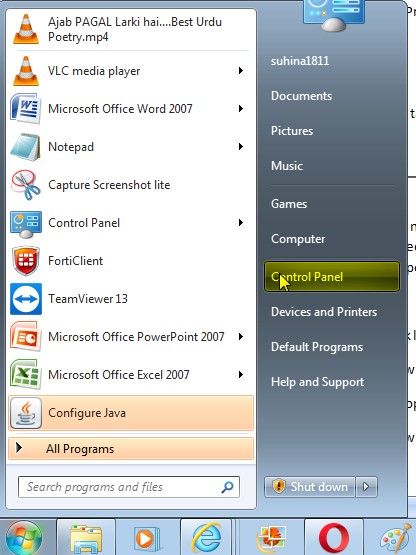
Step i: Open control panel and in the view by category list click on “uninstall a program” a window will open with list of all software installed in the machine, check all software installed and if you find any unwanted software uninstall that. 


Method 4. Check performance of your machine, if it’s not normal (if memory utilization or CPU utilization is not normal)  then there is something wrong, in such case check the task war and find all current running application


How to check performance of your device in windows OS


Step i: click control + Alt + Delete


Step ii: Click on process it will show you the CPU and memory utilization used by all process if you find any unknown process is running then please do further investigation, and stop it if not needed

Note: Before stopping any Process you must know about it, because there are some important Process which suppose to run and if you will stop that you may face problem in normal activity. 


Step iii: Click task manager, then click on application, it will show you all current running applications that you are currently using, 


Method 5. Click on services it will show you the CPU and memory utilization used by all services if you find any unknown service is running then please do further investigation, and stop it if not needed

Note: Before stopping any services you must know about it, because there are some important services which suppose to run and if you will stop that you may face problem in normal activity. 


How Trojan horse comes in device ?


It may come from unauthorized free software, from unknown website, or while downloading any application, audio, video or from untrusted sites like porn site, or from unauthorized email we always need to be sure before opening any attachment in the email.


Example of Trojans:


1. Tiny Banker Trojan:

This is designed to target finance websites.  It works by establishing man-in-the-browser attacks and network sniffing, when it is detected it had been targeted more than 12 banking institute in USA.  It is designed to steal user’s sensitive data, such as account login information and banking codes.


2. RAT: (Remote Administration Tool)


This is one type of Trojan horse, which may give administrator access of a remote device to a bad guy, and a bad guy can install spyware software in your computer, a key logger, screen recording, attacker can copy file or install any software.


Ex: Ghost RAT is RAT Trojan that allows attackers to gain complete, real-time control on a device.

Apart from this few RAT tools used these days are NanoCore, BlackShades, JSpy.


How a Trojan is made:


Today many tools are available in market to make Trojan and attack; some of them are free like BEAST, and some of them are paid software. We can also make Trojan with the help of notepad.


We will take an example here to make a Trojan with the help of Notepad.


Write a Virus code on notepad.


Open notepad and write the below code


@ECHO off

 :top

 START %SystemRoot%\system32\notepad.exe

 GOTO top


Note:  The above code will open notepad endlessly, I am giving a very simple example here, you can write code to delete file, stop services and much more.


After that save file with .bat extension and select all files from “save as types” option 


You will get icon of the bat file like this,


Here the user can easily understand that the file is not a normal file and target user can delete the file so here we need to change the icon of the file. To do that we need to follow the below steps:


Right click on the file and click properties


When you will click on change icon a small window  will open with few icons select anyone from those (Select any one icon like My PC that user click easily)


User will think it is a normal shortcut and when he/she will click on it and the code will perform its job.


Apart from the above Technic there is many tools available which can be use for remote access I will try to cover that in my future blogs.

Sunday, 16 February 2020

Virus and Worm


      Virus and worm


I welcome all my readers to this blog, today we will talk about few important types of malware, this blog will be helpful for all students who wants to learn about cyber security, or want to complete certification like Comp TIA Security+ or CEH.


Introduction:

Malware is a software design to damage a computer (workstation, mobile, server or network), it can delete the data, modify the data or encrypt the data, and it can change the setting of your computer or registry and can spy data from the system.

Types of malware:

Virus and worms
Ransomware and crypto malware
Trojan and RATS
Rootkits
Keyloggers
Adware and Spyware
Bot and Botnets

We will now discuss each one of it one by one.  In this blog we will start with virus and Worms, and I will try to cover all malware one by one in my coming blogs.  Now let’s start with virus

Virus:

The name virus is used from the medical field because computer virus behavior is similar to a virus (It replicates itself). We just need to run a program and then it can replicate itself and it can spread itself by file system or network, sometimes a virus may not cause a problem, and sometimes it can be a disaster. The first virus detected on ARPANET (ARPANET was the network that became the basis for the Internet, in 1970) and its name was Creeper.

These days virus are very common every day thousand of virus are created and spread around globe.

Types of Virus:

Program Virus
Boot sector virus
Script virus
Macro virus
Encrypted virus:  
Polymorphic Virus:  


1. Program Virus: 

These are the part of application, email attachment, or storage media like CD,  floppy, and virus code are written hidden in it, it’s like a trogon and when we run application,when we open the attachment or when we play storage media its code work in background

2. Boot sector virus: 

These are the virus design to effect boot sector/ master boot Record (MBR) or external storage media like CD, floppy disk etc.

3. Script Virus: 

These are web based virus, which attack a computer with the help of a website. Sometimes a malicious website is designed to attack a system, by running script. We can understand it with an example when we download any file from a website or if we play any video on a website, a script can run in background which can be very harmful.

4. Macro virus: 

These are the virus that can be executed from executed files; the best example is Microsoft Office world file. Notepad files can also be used for this purpose, such virus is spread by using email with the attachment. These are the .bat files that excite its code when we click on it. We always suppose to check file extension before exciting it.

5. Encrypted virus:

Attacker send the virus code in encrypted form, so that it cannot be easily detected, in most cases it carry decryption algorithms as well, so that  when it reaches the target the decryption  algorithm code decrypt the file code for execution.

6. Polymorphic Virus


Polymorphic means (occurring in several different forms, in particular with reference to species or genetic variation) we have studied about it in biology and chemistry in our days, the best example is in biology is phenotype , now it’s time to read polymorphic in computer science.
Traditional antivirus works on signature base, so attacker use polymorphic property in coding so that if antivirus detect its signature, it changes its signature in next installation so that antivirus should not detect it.  


I have explained the types of virus, Apart from these we can also categorize virus like Armored Virus, Multipartite Virus, Tunneling Virus, Stealth Virus but these are made based on different types of technique used by virus and I think I do not need to explain that much here.   


Now we will take an example how attacker can write a program to create a virus and how attacker can spread it, I request from my readers to not apply this technique on anyone because it’s illegal, I am writing this blog just for education purpose.

The best example is the .bat file extension program, attacker can spread these file by an attachment in the email.

Below are the steps:

1. Open notepad file.

2. Write the below code.

@echo off

Shut down -s -t 00

3. Save the file with .bat extension

4. And run it just by double clicking it

the command “shutdown -s –t 00 shutdown the computer each time when it starts, so user can never start the computer normally and it may cause to loss data.

Other example is

@echo off

deltree C:\

It will delete files permanently from the hard disk.

How can we protect our computer from virus attack


The best way is to use antivirus with latest virus definition, the antivirus contain signatures of all the virus detected and protect your machine from such virus.
  1.          Use firewall
  2.          Use authenticated website
  3.          Always download from file, video or other documents from good source
  4.          Use emails carefully and do not open attachment from unknown email

If you want to know more about how to protect your machine please read my blog:

Worm: A computer worm is self-replicating malware that duplicates itself to spread to uninfected computers. It can move from one system to another or from one network to other network without human intervention. It uses network as transmission and that’s why it spread quickly.

How we can protect our computer from worm ?

We can use firewall to protect out network from worm, apart from this we can use antivirus with latest signature update.
The main difference between virus and worm

Virus  
  Worm

It needs human intervention

It do not need human intervention

Virus is slower than worm,

It effects more faster than virus

Antivirus plays a very important role to protect our environment from virus

Antivirus and firewall  play important role to protect from worm

Virus main impact is, it delete a file, corrupt a file.

Main purpose of worm is to slowdown the network or system.